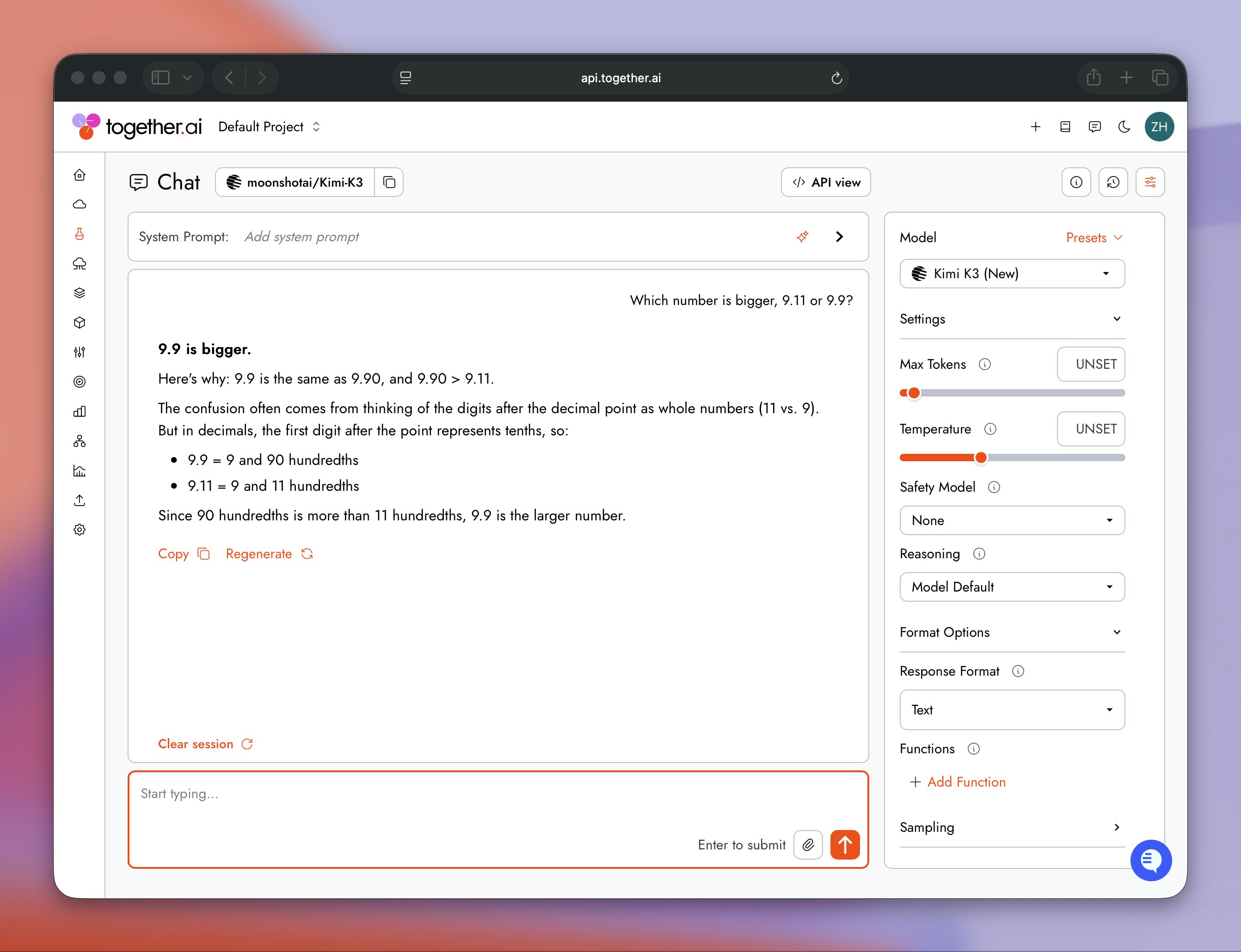
Kimi K3 is Moonshot AI’s most capable model to date: a 2.8-trillion-parameter model and the world’s first open-source model in the 3-trillion-parameter class. It is designed for frontier intelligence work like long-horizon coding, end-to-end knowledge work, and deep reasoning. It is also the first open-weights model competing at the GPT 5.6 Sol and Claude Fable 5 tier, and Together AI is working directly with the Moonshot team to serve it.
The Kimi team is deeply committed to scaling, and it shows: in nine of the twelve months from July 2025 to July 2026, Kimi models set the upper bound of open-model scale. At 2.8 trillion parameters, K3 is now the largest open-weight model ever released.
What is under the hood
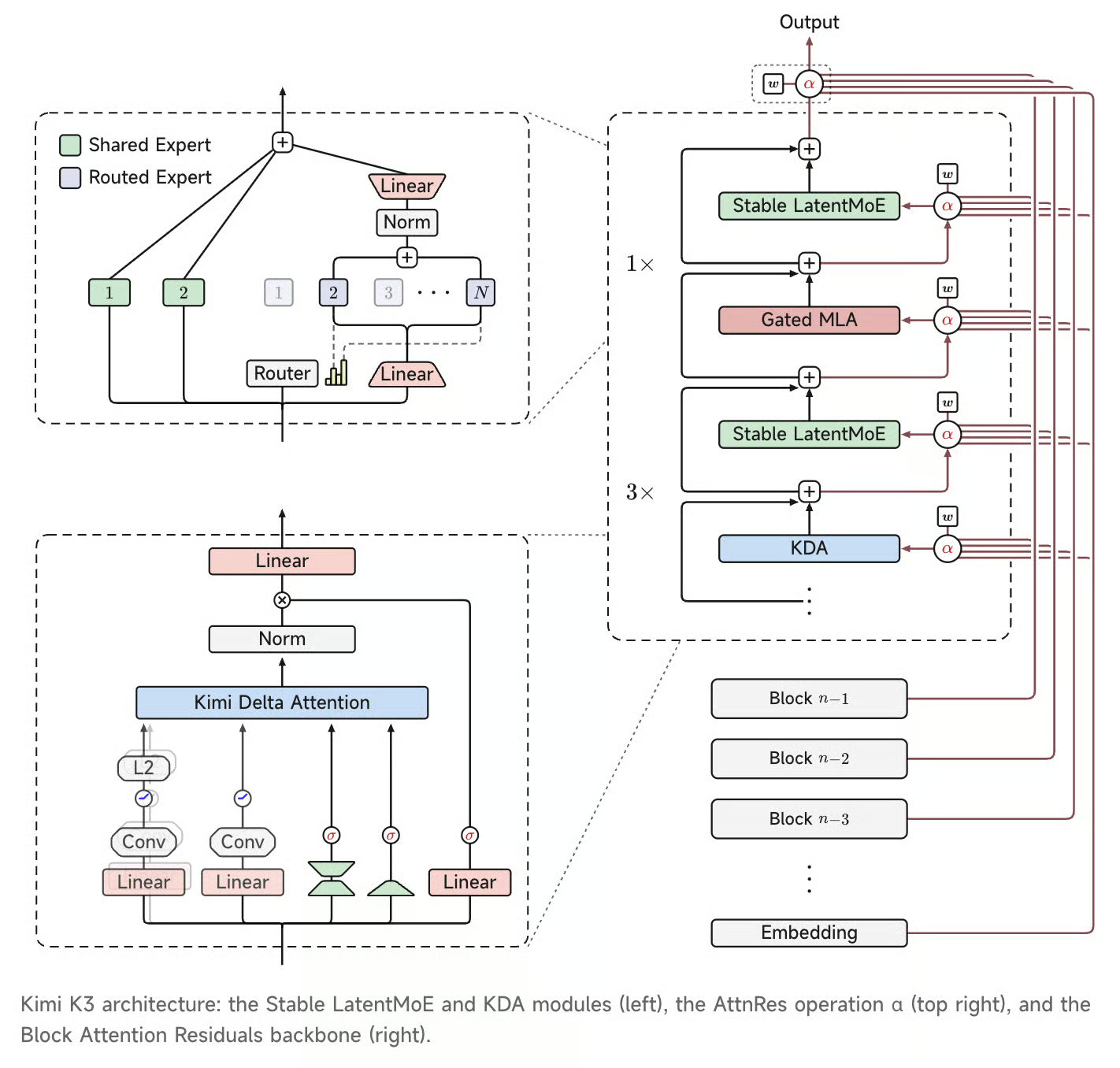
Two architectural updates form K3’s backbone, both designed to help information flow more easily through longer sequences and deeper into the network:
Kimi Delta Attention (KDA): a hybrid linear attention mechanism that provides an efficient foundation for scaling attention across very long contexts. This is the first Kimi model to support a 1M context length.
Attention Residuals (AttnRes): selectively retrieves representations across model depth rather than accumulating them uniformly.
Source: Kimi K3
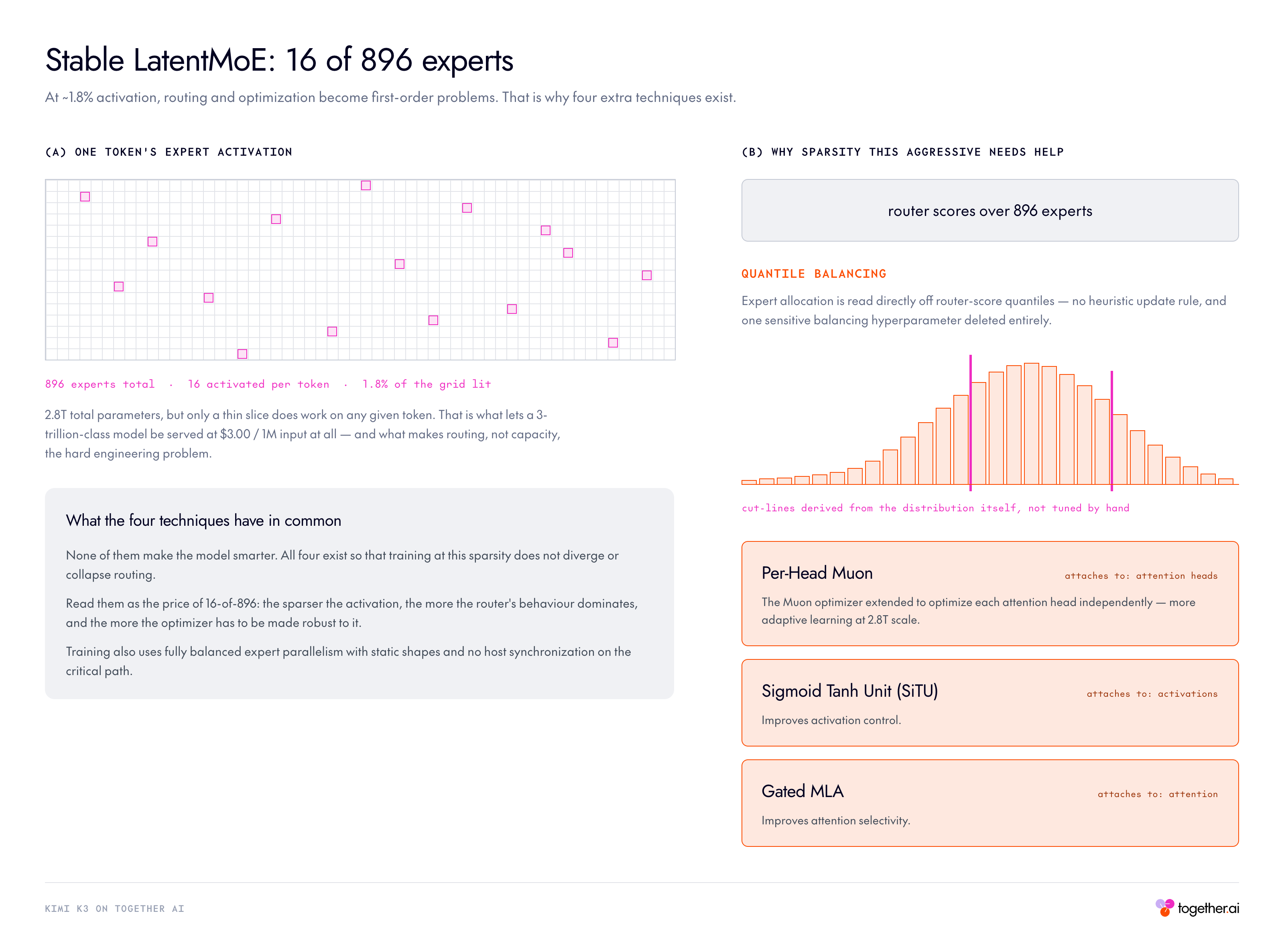
On top of that, Moonshot pushed Mixture-of-Experts sparsity further with the Stable LatentMoE framework, efficiently activating 16 of 896 experts. At this level of sparsity, roughly 2% of experts activated per token, routing and optimization become first-order challenges, so several supporting techniques enable stable training at 2.8T scale:
Quantile Balancing: derives expert allocation directly from router-score quantiles, eliminating heuristic updates and a sensitive balancing hyperparameter.
Per-Head Muon: extends the Muon optimizer to optimize attention heads independently for more adaptive learning at scale.
Sigmoid Tanh Unit (SiTU): improves activation control.
Gated MLA: improves attention selectivity.
How to use Kimi K3 on Together AI
The API is OpenAI-compatible. The snippets below target Together AI and use the official Together Python SDK.
import os
from together import Together

MODEL = "moonshotai/Kimi-K3"

client = Together(
    api_key=os.environ["TOGETHER_API_KEY"],
)

completion = client.chat.completions.create(
    model=MODEL,
    messages=[{"role": "user", "content": "Introduce Kimi K3 in one sentence."}],
    max_tokens=130_000,
)
print(completion.choices[0].message.content)
Thinking effort
K3 can be configured with the top-level reasoning_effort field. Three levels are supported: low, high, and max, with max as the default. On Together, thinking can also be switched off via the standard reasoning={“enabled”: False} toggle.
# Adjust depth: "low" | "high" | "max"
completion = client.chat.completions.create(
    model=MODEL,
    reasoning_effort="max",
    messages=[{"role": "user", "content": "Prove that the square root of 2 is irrational."}],
    max_tokens=8192,
)

# Instant mode, no thinking tokens billed at all
fast = client.chat.completions.create(
    model=MODEL,
    messages=[{"role": "user", "content": "What is the capital of France?"}],
    reasoning={"enabled": False},
    max_tokens=256,
)
Streaming
Streaming responses deliver separate reasoning_content (the thinking trace) and final-answer content deltas.
stream = client.chat.completions.create(
    model=MODEL,
    messages=[{"role": "user", "content": "Explain why the sky is blue."}],
    max_tokens=4096,
    stream=True,
)

in_answer = False
for chunk in stream:
    if not chunk.choices:
        continue
    delta = chunk.choices[0].delta
    thinking = getattr(delta, "reasoning_content", None) or getattr(delta, "reasoning", None)
    if thinking:
        print(thinking, end="", flush=True)
    if delta.content:
        if not in_answer:
            print("\n--- answer ---")
            in_answer = True
        print(delta.content, end="", flush=True)
Vision input
Multiple images can be provided as input. Moonshot has also released a visual reasoning benchmark, Perception Bench.
import base64
from pathlib import Path

# Option A: pass an image by URL
IMAGE_URL = "
image_content = {"type": "image_url", "image_url": {"url": IMAGE_URL}}

# Option B: pass a local image as base64 (uncomment to use)
# image_data = base64.b64encode(Path("image.png").read_bytes()).decode()
# image_content = {"type": "image_url",
#                  "image_url": {"url": f"data:image/png;base64,{image_data}"}}

completion = client.chat.completions.create(
    model=MODEL,
    max_tokens=2048,
    messages=[{
        "role": "user",
        "content": [
            image_content,
            {"type": "text", "text": "Describe this image."},
        ],
    }],
)
Vision limits:
No limit on the number of images, but the whole request body must stay under 100 MB.
Recommended maxima: 4K (4096×2160) for images. Higher resolutions cost processing time and tokens without improving understanding.
Token cost scales with resolution.
Structured output
Use response_format with json_schema and strict: true to constrain the final message.content.
The looser {“type”: “json_object”} mode also works on Together when you only need syntactically valid JSON. Either way, keep max_tokens generous: the whole thinking trace is spent before the first schema-constrained token is emitted, so a tight cap truncates the JSON rather than the reasoning.
Tools and tool_choice
K3 keeps the standard tool-choice constraints. The standard loop: declare functions in tools; when the model returns tool_calls, append the complete assistant message to history, then append one tool message with the matching tool_call_id for each call, then call again. Use tool_choice=”required” on a first turn to force at least one tool call, and switch back to “auto” afterward. Changing tool_choice does not invalidate the prefix cache.
import json

tools = [{
    "type": "function",
    "function": {
        "name": "get_weather",
        "description": "Get the current weather for a city.",
        "parameters": {
            "type": "object",
            "properties": {
                "city": {"type": "string", "description": "City name, e.g. Paris"},
                "unit": {"type": "string", "enum": ["celsius", "fahrenheit"]},
            },
            "required": ["city"],
            "additionalProperties": False,
        },
    },
}]

def get_weather(city, unit="celsius"):
    return {"city": city, "temperature": 21, "unit": unit, "conditions": "sunny"}

messages = [{"role": "user", "content": "What's the weather in Paris?"}]
choice_mode = "required"          # force a tool call on turn one

for _ in range(5):
    response = client.chat.completions.create(
        model=MODEL,
        messages=messages,
        tools=tools,
        tool_choice=choice_mode,
        max_tokens=8192,
    )
    choice = response.choices[0]
    message = choice.message

    # Append the COMPLETE assistant message, thinking trace included.
    messages.append(message.model_dump(exclude_none=True))

    if choice.finish_reason != "tool_calls" or not message.tool_calls:
        print(message.content)
        break

    for call in message.tool_calls:
        try:
            args = json.loads(call.function.arguments)
        except json.JSONDecodeError:
            args = {}
        messages.append({
            "role": "tool",
            "tool_call_id": call.id,
            "content": json.dumps(get_weather(**args)),
        })

    choice_mode = "auto"          # hand control back after the forced turn
Dynamic tool loading
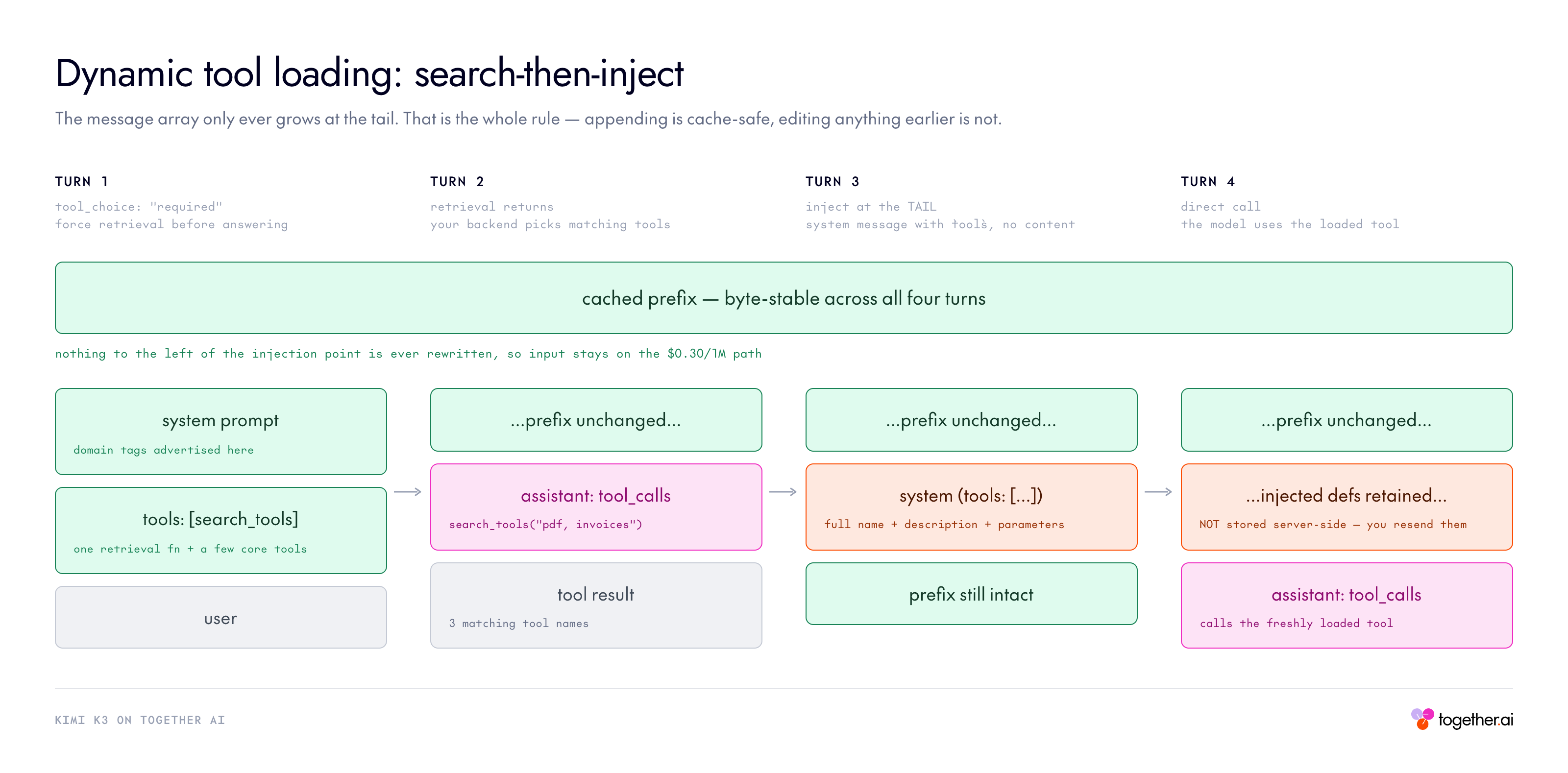
You can place a complete tool definition (full name, description, and parameters) inside a system message that carries a tools field and no content. The tool becomes available from that message’s position onward.
Key rules:
Dynamic declarations use exactly the same format as the top-level tools field.
They apply per request and are not retained by the server, so keep the message in later request history yourself. Keeping it preserves both the tool’s availability and the cached prefix; dropping it means the model can no longer call that tool and the changed prefix may miss the cache.
Appending a dynamic declaration to the end of messages does not affect the cached prefix; removing or modifying an earlier declaration may hurt cache hits after the point of change.
Recommended pattern for large tool catalogs:
Conversation start: declare only a single search_tools function (implemented by your backend) plus a few core tools, and advertise searchable domain tags in the system prompt.
First turn: set tool_choice: “required” to force retrieval before answering.
Inject on demand: insert the full definitions of matching tools via a system message based on retrieval results.
Call directly: the model uses the loaded tools in subsequent generations.
Cost trade-off: decide reasoning_effort before the conversation starts.
Code Example:
CATALOG = {
    "convert_currency": {
        "type": "function",
        "function": {
            "name": "convert_currency",
            "description": "Convert an amount from one currency to another.",
            "parameters": {
                "type": "object",
                "properties": {
                    "amount": {"type": "number"},
                    "from_currency": {"type": "string"},
                    "to_currency": {"type": "string"},
                },
                "required": ["amount", "from_currency", "to_currency"],
                "additionalProperties": False,
            },
        },
    },
}

search_tools = {
    "type": "function",
    "function": {
        "name": "search_tools",
        "description": "Search the tool catalog. Tags: finance, travel, files.",
        "parameters": {
            "type": "object",
            "properties": {"query": {"type": "string"}},
            "required": ["query"],
            "additionalProperties": False,
        },
    },
}

messages = [{"role": "user", "content": "Convert 100 USD to EUR."}]

# 1. Force retrieval before answering.
first = client.chat.completions.create(
    model=MODEL, messages=messages, tools=[search_tools],
    tool_choice="required", max_tokens=8192,
)
call = first.choices[0].message.tool_calls[0]
messages.append(first.choices[0].message.model_dump(exclude_none=True))
messages.append({"role": "tool", "tool_call_id": call.id,
                 "content": json.dumps(list(CATALOG))})

# 2. Inject matching definitions at the TAIL. `tools` field, NO content.
messages.append({"role": "system", "tools": [CATALOG["convert_currency"]]})

# 3. The model calls the freshly loaded tool directly.
second = client.chat.completions.create(
    model=MODEL, messages=messages, tools=[search_tools],
    tool_choice="auto", max_tokens=8192,
)
print(second.choices[0].message.tool_calls)
# -> convert_currency({"amount":100,"from_currency":"USD","to_currency":"EUR"})
1M context and automatic caching
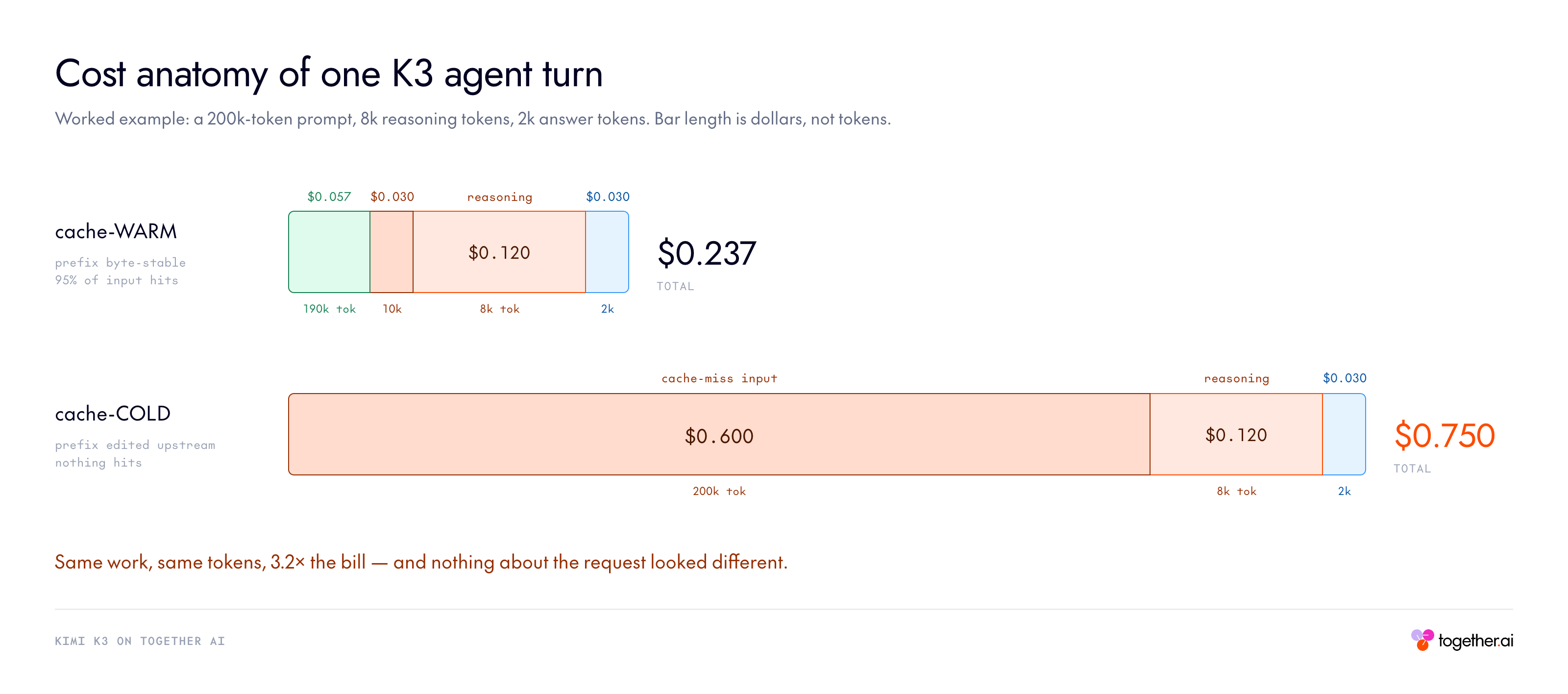
Together supports the full 1M context length, and context caching is automatic. Keep your long prefix (system prompt, knowledge base, repo dump) byte-stable across requests so later calls can hit the cache. Moonshot recommends placing fixed bulk context (knowledge documents) at the very beginning of the messages array, ahead of the system message, then appending questions and replies after it.
The sampling parameters are fixed and you should omit them from requests. The model was trained using these params and does not support setting alternatives:
temperature = 1.0
top_p = 0.95
n = 1
presence_penalty = 0
frequency_penalty = 0
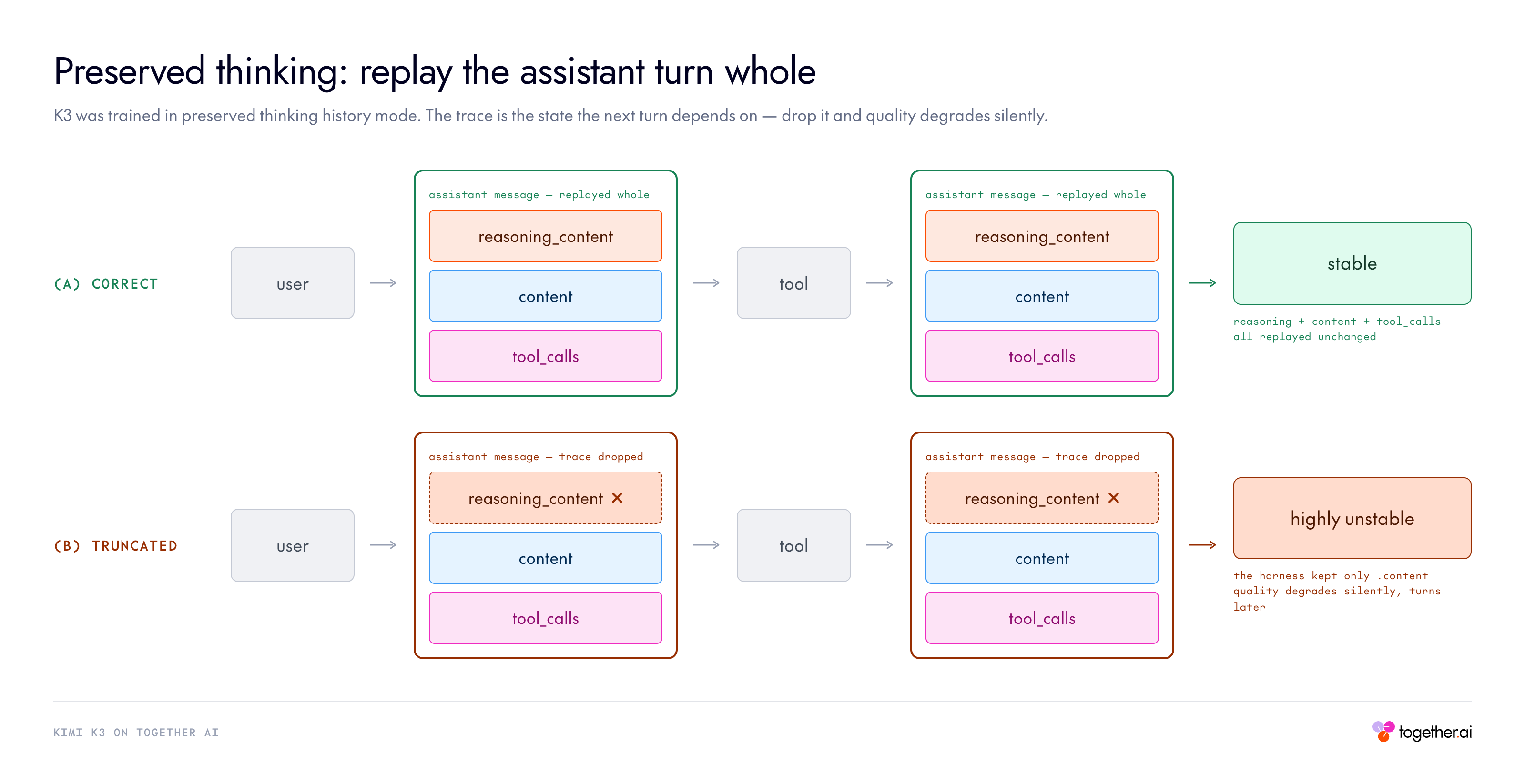
Preserved thinking
K3 was trained in preserved thinking history mode, so the trace is the state the next turn depends on. Use the following to preserve thinking tokens from the previous turn and forward them to future turns.
SECRET = "48213"
TRACE  = "For the session codeword I will use 48213. Committing to 48213 as the codeword."

messages = [
    {"role": "user", "content": "Pick a 5-digit codeword for our session and remember it. "
                                "Reply with exactly: OK"},
    # The trace rides along on the assistant turn. No flag needed.
    {"role": "assistant", "content": "OK", "reasoning_content": TRACE},
    {"role": "user", "content": "What codeword did you pick? Reply with just the number."},
]

completion = client.chat.completions.create(
    model=MODEL,
    messages=messages,
    max_tokens=4000,
    chat_template_kwargs={"preserve_thinking": True}
)
print(completion.choices[0].message.content)   # -> 48213
Drop the reasoning_content line and the same call answers with a different freshly-invented number every time. In real code you never hand-write the trace; you replay what the model produced, which is the one-liner from the tool loop:
# Turn 1 - let K3 think.
first = client.chat.completions.create(
    model=MODEL,
    messages=[{"role": "user", "content": "Pick a random 5-digit number and commit to it. "
                                          "Do not tell me. Reply with exactly: OK"}],
    max_tokens=4000,
)

# Replay the assistant turn WHOLE. model_dump keeps reasoning_content alongside content.
history = [
    {"role": "user", "content": "Pick a random 5-digit number and commit to it. "
                                "Do not tell me. Reply with exactly: OK"},
    first.choices[0].message.model_dump(exclude_none=True),
    {"role": "user", "content": "What number did you pick? Reply with just the number."},
]

second = client.chat.completions.create(model=MODEL, messages=history, max_tokens=4000)
print(second.choices[0].message.content)
Kimi K3 pricing
Kimi K3 is priced per token, with a cache-hit input tier that rewards stable prefixes:
Kimi K3 pricing
Tier
Price per 1M tokens
Input (cache hit)
\$0.30
Input (cache miss)
\$3.00
Output
\$15.00
Context window: 1,048,576 tokens (1M). Thinking tokens are billed as output.
Two cost aspects to internalize:
The cache is your lever. With a >90% hit rate in coding workloads, effective input cost trends toward the \$0.30 floor, but only if you keep prefixes stable. Restructuring earlier messages or tool declarations will break it.
Reasoning is billed as output and can be dialed in. Thinking tokens are output tokens at \$15/M and thinking cannot be fully disabled, but reasoning_effort now has three levels. max remains the default, so a pipeline that never sets the field is paying the maximum reasoning bill on every call, including the trivial ones.
Kimi K3 benchmarks
Across the evaluation suite, Kimi K3 posts frontier-level numbers. It leads the field on several coding and agentic benchmarks (SWE Marathon, BrowseComp, DeepSearchQA, AutomationBench, OmniDocBench) and stays competitive with the strongest proprietary models on others, while clearly outperforming the other open model tested, GLM-5.2. On a handful of benchmarks it trails Claude Fable 5 and GPT 5.6 Sol, which is consistent with Moonshot’s own positioning of the model.
All Kimi K3 results below use reasoning effort set to max.
Kimi K3 benchmarks
Reasoning effort: max
Benchmark
Kimi K3
max
Claude Fable 5
max, with fallback
GPT 5.6 Sol
max
Claude Opus 4.8
max
GLM-5.2
max
Coding
DeepSWE
67.5
70.0
73.0
59.0
46.2
Program Bench
77.8
76.8
77.6
71.9
63.7
Terminal Bench 2.1
88.3
84.6
88.8
84.6
82.7
FrontierSWE
81.2
86.6
71.3
66.7
67.3
SWE Marathon
42.0
35.0
39.0
40.0
13.0
PostTrain Bench
36.6
41.4
34.6
34.1
34.3
MLS Bench
48.3
49.9
46.2
42.8
40.4
Kimi Code Bench 2.0 (internal)
72.9
76.9
64.8
71.7
64.2
Agentic
GDPval-AA v2 (Elo)
1668
1760
1748
1600
1514
BrowseComp
91.2
88.0
90.4
84.3
N/A
DeepSearchQA (F1)
95.0
94.2
N/A
93.1
N/A
Toolathlon-Verified
73.2
77.9
74.9
76.2
59.9
MCP Atlas
84.2
84.7
83.6
83.6
82.6
Automation Bench
30.8
29.1
29.7
27.2
12.9
Job Bench
52.9
57.4
46.5
48.4
43.4
AA-Briefcase (Elo)
1548
1583
1495
1354
1260
APEX-Agents
41.0
43.3
39.9
39.4
35.6
Office QA Pro
63.3
69.9*
63.2*
63.9*
41.4
SpreadsheetBench 2
34.8
34.7*
32.4*
31.6*
28.1
DECK-Bench (internal)
73.5
73.0
74.7
66.9
68.6
Reasoning & knowledge
GPQA-Diamond
93.5
92.6
94.1
91.0
91.2
HLE-Full
43.5
53.3
44.5
49.8*
N/A
HLE-Full w/ tools
56.0
63.0
58.0
57.9*
N/A
Vision
MMMU-Pro
81.6
81.2
83.0
78.9
N/A
MMMU-Pro w/ python
83.4
86.5
84.6
82.7
N/A
CharXiv (RQ)
84.8
88.9
84.6
80.5
N/A
CharXiv (RQ) w/ python
91.3
93.5
89.1
89.9
N/A
MathVision
94.3
94.8
95.8
86.7
N/A
MathVision w/ python
97.8
98.6
97.8
97.1
N/A
BabyVision w/ python
85.7
90.5
88.9
81.2
N/A
ZeroBench_main (pass@5)
23.0
23.0
17.0
17.0
N/A
ZeroBench_main w/ python (pass@5)
41.0
46.0
35.0
34.0
N/A
WorldVQA ForceAnswer
51.0
56.7
41.8
39.1
N/A
OmniDocBench
91.1
89.8
85.8
87.9
N/A
PerceptionBench
58.5
57.2
59.7
47.2
N/A
All Kimi K3 results use reasoning effort set to max. Values marked with an asterisk (*) are reported under conditions that differ from the base run — for example, cited from an external source or a different harness. N/A indicates no published score. Shaded cells mark the leading result in that row. See the source report for exact per-benchmark methodology. Source: Kimi K3.
How Kimi K3 compares to the frontier
Aggregate benchmark tables only go so far. For a head-to-head read on cost, coding quality, and routing behavior, we ran Kimi K3 against the leading proprietary models on DeepSWE:
Frequently asked questions
What is Kimi K3? Kimi K3 is Moonshot AI’s flagship 2.8-trillion-parameter model and the first open-source model in the 3-trillion-parameter class, built for long-horizon coding, knowledge work, and reasoning.
Is Kimi K3 open source?
Yes. It is released as an open-weights model, and Together AI works directly with the Moonshot team to serve it.
What is Kimi K3’s context window?
1M tokens (1,048,576), supported in full on Together AI with automatic context caching.
How much does Kimi K3 cost on Together AI?
\$0.30 per 1M cache-hit input tokens, \$3.00 per 1M cache-miss input tokens, and \$15.00 per 1M output tokens.
Can you turn off thinking on Kimi K3?
On Together AI you can disable thinking with reasoning={“enabled”: False}, or dial reasoning depth with reasoning_effort set to low, high, or max.
Does Kimi K3 support vision?
Yes. It has native vision and accepts multiple images per request, as long as the total request body stays under 100 MB.
Kimi K3 is on Together AI. Run it and ship it to production.
At the ISC conference running in Hamburg this week, NVIDIA is introducing new software that speeds AI for science, from chemistry and materials discovery to the search for dark matter. …
The last few months have been an exciting time for the Gemma family of open models. We introduced Gemma 3 and Gemma 3 QAT, delivering state-of-the-art performance for single cloud…
Today, Thinking Machines Lab released Inkling, a new multimodal mixture-of-experts model built for token-efficient reasoning, native multimodal understanding, and broad task versatility. Together AI is excited to collaborate with the…
In 1928, London was in the middle of a terrible health crisis, devastated by bacterial diseases like pneumonia, tuberculosis, and meningitis. Confined in sterile laboratories, scientists and doctors were stuck…
Today, we’re excited to announce a deep-link integration between Hugging Face and Amazon SageMaker AI. Developers can now go from model discovery to hands-on experimentation in SageMaker Studio with a…
Today, Google DeepMind released DiffusionGemma — an experimental open model built for exceptionally fast text generation. NVIDIA has optimized DiffusionGemma to run even faster across NVIDIA GeForce RTX GPUs, the NVIDIA RTX PRO platform and NVIDIA DGX Spark systems, from local PCs to the cloud. …