Using NumPy reshape() to Change the Shape of an Array
The main data structure you’ll use in NumPy, Python’s core library for numerical computing, is the N-dimensional array. Sometimes you need to reorganize the values in a NumPy array into a different layout. That’s what NumPy’s reshape() is for. It changes an array’s shape without changing its data, so you can fit the same values into whatever configuration your program needs.
By the end of this tutorial, you’ll understand that:
- You reshape a NumPy array by passing a compatible shape to
.reshape(), which rearranges the data without changing its values. - A new shape is compatible only when its total number of elements matches the original array.
reshape()can add or remove dimensions, so the new array doesn’t need the same number of dimensions as the original.- The
orderparameter sets whether the data is read in row-major ("C") or column-major ("F") order. - Passing
-1for one dimension letsreshape()infer that dimension’s length automatically.
The shape of an array describes the number of dimensions in the array and the length of each dimension. In this tutorial, you’ll learn how to reshape a NumPy array to place all its data in a different configuration. When you complete this tutorial, you’ll be able to alter the shape of any array to suit your application’s needs.
For this tutorial, you should be familiar with the basics of NumPy and N-dimensional arrays. You can read NumPy Tutorial: Your First Steps Into Data Science in Python to learn more about NumPy before diving in.
Supplemental Material: Click here to download the supporting materials that you’ll use with NumPy reshape().
Take the Quiz: Test your knowledge with our interactive “Using NumPy reshape() to Change the Shape of an Array” quiz. You’ll receive a score upon completion to help you track your learning progress:

Interactive Quiz
Using NumPy reshape() to Change the Shape of an Array
Practice NumPy reshape() by changing an array’s shape, adding or removing dimensions, and controlling how the data gets rearranged.
Install NumPy
You’ll need to install NumPy to your environment to run the code in this tutorial and explore reshape(). You can install the package using pip within a virtual environment. Select either the Windows or Linux + macOS tab below to see instructions for your operating system:
It’s a convention to use the alias np when you import NumPy. To get started, you can import NumPy in the Python REPL:
>>> import numpy as np
Now that you’ve installed NumPy and imported the package in a REPL environment, you’re ready to start working with NumPy arrays.
Understand the Shape of NumPy Arrays
You’ll use NumPy’s ndarray in this tutorial. In this section, you’ll review the key features of this data structure, including an array’s overall shape and number of dimensions.
You can create an array from a list of lists:
>>> import numpy as np
>>> numbers = np.array([[1, 2, 3, 4], [5, 6, 7, 8]])
>>> numbers
array([[1, 2, 3, 4],
       [5, 6, 7, 8]])
The function np.array() returns an object of type np.ndarray. This data structure is the main data type in NumPy.
You can describe the shape of an array using the length of each dimension of the array. NumPy represents this as a tuple of integers. The array numbers has two rows and four columns. Therefore, this array has a (2, 4) shape:
>>> numbers.shape
(2, 4)
You can represent the same data using a different shape:
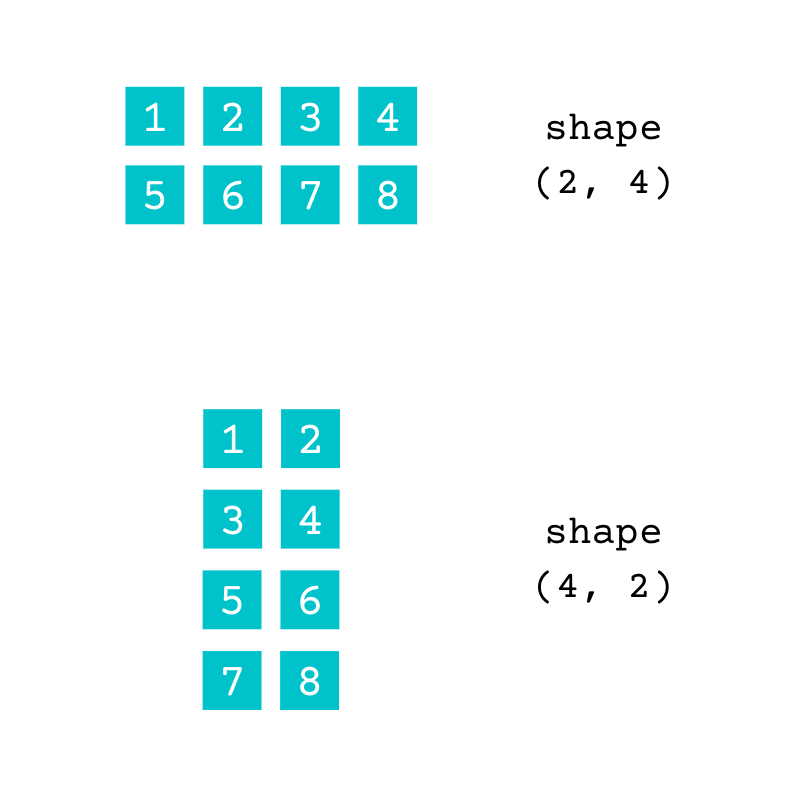
Both of these arrays contain the same data. The array with the shape (2, 4) has two rows and four columns, and the array with the shape (4, 2) has four rows and two columns. You can check the number of dimensions of an array using .ndim:
>>> numbers.ndim
2
Read the full article at »
[ Improve Your Python With 🐍 Python Tricks 💌 – Get a short & sweet Python Trick delivered to your inbox every couple of days. >> Click here to learn more and see examples ]